<?xml version="1.0" encoding="utf-8"?><feed xmlns="http://www.w3.org/2005/Atom" ><generator uri="https://jekyllrb.com/" version="4.3.4">Jekyll</generator><link href="http://localhost:4000/feed.xml" rel="self" type="application/atom+xml" /><link href="http://localhost:4000/" rel="alternate" type="text/html" /><updated>2026-06-30T16:44:14+01:00</updated><id>http://localhost:4000/feed.xml</id><title type="html">chocksaway.com</title><subtitle>building software systems and infrastructure
</subtitle><author><name>milesd</name></author><entry><title type="html">Model Context Protocol.</title><link href="http://localhost:4000/python/tools/ai/2026/06/26/Model-Context-Protocol.html" rel="alternate" type="text/html" title="Model Context Protocol." /><published>2026-06-26T19:27:00+01:00</published><updated>2026-06-26T19:27:00+01:00</updated><id>http://localhost:4000/python/tools/ai/2026/06/26/Model%20Context%20Protocol</id><content type="html" xml:base="http://localhost:4000/python/tools/ai/2026/06/26/Model-Context-Protocol.html"><![CDATA[<h3 id="building-an-mcp-server">Building an MCP server</h3>

<p>The Model Context Protocol (MCP) allows for the creation of a server which can access and provide data to clients.  Python has a mcp.server library.</p>

<hr />
<p>For reference <a href="https://modelcontextprotocol.io/docs/develop/build-server">Building an MCP server</a> including Python and TypeScript examples.</p>

<hr />

<p>Gist <a href="https://gist.github.com/chocksaway/d96a76e52a991d9050266dfb7321d7ac">server.py</a> link.</p>

<p>MCP servers can provide three main types of capabilities:</p>

<p>One is File-like data that can be read by clients (like API responses or file contents).</p>

<p>I used the following (an arbitrary Obsidian note):</p>
<div class="language-plaintext highlighter-rouge"><div class="highlight"><pre class="highlight"><code>---
title: "Publish CMS"
tags: [project, p2p, planning]
date: 2026-06-01
aliases:
  - P2P
  - Imager
---

## Publish CMS
P2P is the transport layer for the Imager CMS

Key goals:
- The Imager CMS should be able to publish content to a P2P network.
- All content will be routed, receive an acknowledgment with a unique uuid and a version.
- The hash of the content will be used to verify integrity and authenticity.

## Appendix
- Peer-to-peer network implementation
- IntelliJ Copilot
- Ubuntu
</code></pre></div></div>

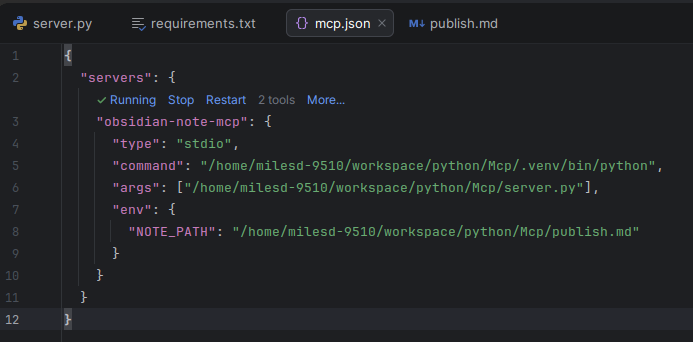
<p>I configured the Intellij mcp.json to point to the server.py, and the publish.md file.</p>

<hr />

<p>The command is using the .venv/bin/python3 virtual environment python interpreter.
<img src="/assets/img/mcp/mcp-json.png" alt="mcp-json.png" />
Located in ~/.config/github-copilot/intellij/mcp.json</p>

<hr />

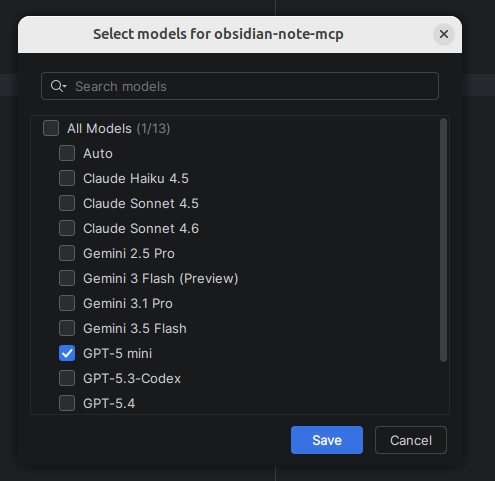
<p>I configured the model:<br />
<img src="/assets/img/mcp/mcp-model.png" alt="mcp-model.png" /></p>

<hr />

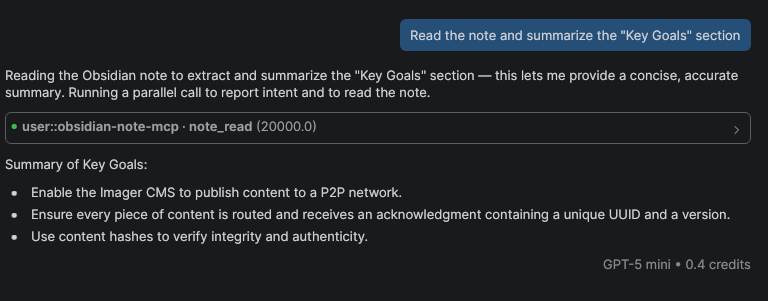
<p>I asked co-pilot to Read the note and summarize the “Key Goals”:
<img src="/assets/img/mcp/key-goals.png" alt="key-goals.png" /></p>]]></content><author><name>milesd</name></author><category term="Python" /><category term="Tools" /><category term="AI" /><summary type="html"><![CDATA[Building an MCP server]]></summary></entry><entry><title type="html">Upskilling - Jupyter</title><link href="http://localhost:4000/python/2026/06/03/Upskilling-Jupyter.html" rel="alternate" type="text/html" title="Upskilling - Jupyter" /><published>2026-06-03T22:55:00+01:00</published><updated>2026-06-03T22:55:00+01:00</updated><id>http://localhost:4000/python/2026/06/03/Upskilling%20-%20Jupyter</id><content type="html" xml:base="http://localhost:4000/python/2026/06/03/Upskilling-Jupyter.html"><![CDATA[<h3 id="developing-skills-in-jupyter">Developing skills in Jupyter</h3>

<p>I want to develop skills in Python, data pipelines, transformation, wrangling, and visualisation.</p>

<p><em>Jupyter</em> is one of tools in the toolbox.  I touched on it briefly in the past, but I had a different goal at the time, to learn Python.</p>

<p>I’m returning to Jupyter with a different goal, to learn how to use it for data work.  I want to build solid skills with these tools.</p>

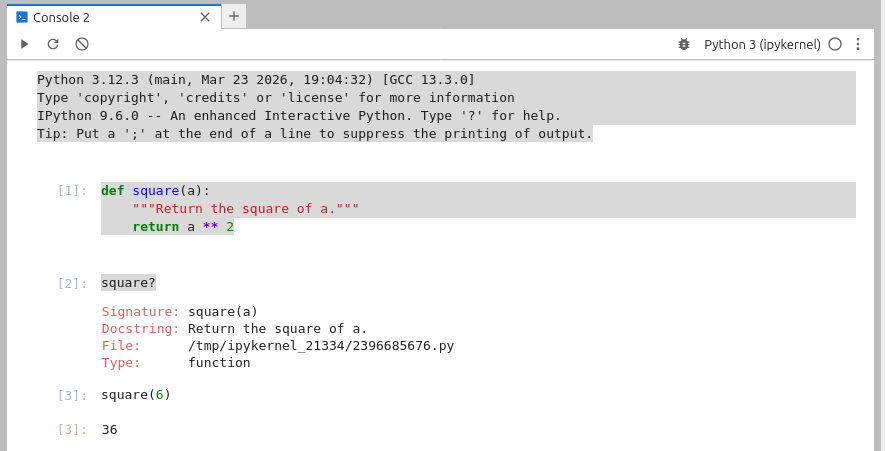
<p><img src="/assets/img/jupyter.png" alt="Learning Jupyter" /></p>

<p><strong>Create</strong> a square function which returns the square of a number:</p>

<p><strong>To</strong> get a description of the function us a square?  To call the function, use square(6) to return 36.</p>]]></content><author><name>milesd</name></author><category term="Python" /><summary type="html"><![CDATA[Developing skills in Jupyter]]></summary></entry><entry><title type="html">Git Copy Restore</title><link href="http://localhost:4000/tools/2026/05/21/Git-Copy-Restore.html" rel="alternate" type="text/html" title="Git Copy Restore" /><published>2026-05-21T19:55:00+01:00</published><updated>2026-05-21T19:55:00+01:00</updated><id>http://localhost:4000/tools/2026/05/21/Git%20Copy%20Restore</id><content type="html" xml:base="http://localhost:4000/tools/2026/05/21/Git-Copy-Restore.html"><![CDATA[<h3 id="learning-rust-and-implementing-a-git-copy-restore-tool">Learning Rust and implementing a Git copy restore tool</h3>

<p><em>New functionality –just *.txt which copies or restores just the files in a wildcard</em></p>

<p>Git copy and restore (<a href="https://github.com/chocksaway/gitcopyrestore">gitcr</a>) is a Rust command-line tool that allows you to copy “changed” files from a local git repo. They are copied to a runs directory with a timestamp and the name of the git repo. Files can be restored to a git repository from the “copy” in the runs directory.</p>

<p>The tool is designed to handle nested directories.</p>

<div class="language-plaintext highlighter-rouge"><div class="highlight"><pre class="highlight"><code>% cargo test
Compiling stable_deref_trait v1.2.1
[snip]

running 7 tests
test tests::checks_arg_count_and_make_sure_copy_or_restore ... ok
test tests::check_there_are_three_args_for_a_restore ... ok
test tests::reject_restore_with_only_two_args ... ok
test tests::rejects_wrong_arg_count ... ok
test tests::restore_files_to_git_repo_copies_nested_file_when_dest_parent_missing ... ok
test tests::copy_files_from_src_to_dest_copies_single_file ... ok
test tests::list_tracked_repo_files_returns_only_local_changes ... ok

test result: ok. 7 passed; 0 failed; 0 ignored; 0 measured; 0 filtered out; finished in 0.07s

% cargo build --release
Finished `release` profile [optimized] target(s) in 0.16s

% cd target/release

% ./gitcr
Usage: gitcr --copy path_to_repo | --restore copy_path path_to_git_repo | --just *.rs wildcard

./gitcr --copy rust/gitcopyrestore
Copying from: /rust/gitcopyrestore
Files to copy from rust/gitcopyrestore:
Copied: README.md

% ls runs/1778147782_gitcopyrestore
README.md

% ./gitcr --restore runs/1778147782_gitcopyrestore ./rust/gitcopyrestore
Restoring from target path to git repo: runs/1778147782_gitcopyrestore ./rust/gitcopyrestore
Restoring files from runs/1778147782_gitcopyrestore to git repo at ./rust/gitcopyrestore
Files to copy from runs/1778147782_gitcopyrestore:
Copied: README.md
</code></pre></div></div>]]></content><author><name>milesd</name></author><category term="Tools" /><summary type="html"><![CDATA[Learning Rust and implementing a Git copy restore tool]]></summary></entry><entry><title type="html">Keeping a Buffer</title><link href="http://localhost:4000/managing%20change/2026/05/21/Keeping-a-Buffer.html" rel="alternate" type="text/html" title="Keeping a Buffer" /><published>2026-05-21T18:55:00+01:00</published><updated>2026-05-21T18:55:00+01:00</updated><id>http://localhost:4000/managing%20change/2026/05/21/Keeping%20a%20Buffer</id><content type="html" xml:base="http://localhost:4000/managing%20change/2026/05/21/Keeping-a-Buffer.html"><![CDATA[<h3 id="ive-recently-been-converting-apps-to-spring-boot-4">I’ve recently been converting apps to Spring Boot 4.</h3>

<p>A key part of this is converting from Jackson 2 to 3.</p>

<p>This post is not about the conversion, but the importance of keeping a buffer.</p>

<p>Not a <em>FileInputStream buffer</em>, but rather capacity to make changes when things go pear shaped (don’t go to plan).</p>

<p>The ability to keep a clear head when the API is broken, environment x is broken, and you are blocking features.</p>

<p>Making minimal code changes to get the API working again is the objective.</p>

<p>As you make changes, make written notes in conjunction with writing small succinct tests to verify your thinking.
These will be your audit trail to understand what you did, and why you did it.</p>

<p>This may seem like overkill, but when you have lots of plates spinning, the ability to understand your thinking path is vital.</p>

<h4 id="the-buffer-is-the-uninterrupted-space-to-understand-the-problem">The buffer is the uninterrupted space to understand the problem</h4>

<p>In a situation (like the above) I do my best work some hours before the working day starts.</p>

<h4 id="lack-of-interruptions-is-important">Lack of interruptions is important</h4>

<p>When there is a clear plan to accomplish before the day starts, it’s important to not be hindered by interruptions.
I used to get sidetracked, but today I block out time before work <em>starts</em>.</p>

<h4 id="share">Share</h4>

<p>Share your working habits with team members, and ask for support to keep the buffer clear.</p>

<p>After a while it won’t just be your buffer, but the whole team’s buffer.</p>

<h4 id="other-situations">Other situations</h4>

<p>I follow the same process when I am on out-of-hours support, and need to triage an issue.</p>

<h4 id="do-these-things">Do these things</h4>

<h4 id="whenever-you-need-a-buffer-do-these-things">Whenever you need a buffer, do these things:</h4>

<ul>
  <li>Provide timely updates.  If you say you will give an update in half an hour, do it.</li>
  <li>If you are in a jam, ask someone to handle the communication with stakeholders, so you can focus on the problem.</li>
  <li>Don’t be afraid to ask for help, but make sure you understand the situation first, and the path to move things forward.</li>
</ul>]]></content><author><name>milesd</name></author><category term="Managing Change" /><summary type="html"><![CDATA[I’ve recently been converting apps to Spring Boot 4.]]></summary></entry><entry><title type="html">Spring Boot Session Expiry with Undertow</title><link href="http://localhost:4000/spring%20boot/2024/11/11/Spring-Boot-Session-Expiry-with-Undertow.html" rel="alternate" type="text/html" title="Spring Boot Session Expiry with Undertow" /><published>2024-11-11T17:33:00+00:00</published><updated>2024-11-11T17:33:00+00:00</updated><id>http://localhost:4000/spring%20boot/2024/11/11/Spring%20Boot%20Session%20Expiry%20with%20Undertow</id><content type="html" xml:base="http://localhost:4000/spring%20boot/2024/11/11/Spring-Boot-Session-Expiry-with-Undertow.html"><![CDATA[<h4 id="ive-been-working-on-a-spring-boot-project-recently-and-i-needed-to-set-the-session-expiry-time">I’ve been working on a Spring Boot project recently and I needed to set the session expiry time.</h4>

<p>I was using spring-boot-starter-web, and I was getting inconsistent behaviour from Tomcat webserver (I suspect that Tomcat was setting it’s own timeout value, which was overriding the 10 second in application.properties).</p>

<p>I decided to use Undertow.</p>

<p>I did this by putting an exclusion in the pom.xml, which excludes the Tomcat dependency, and then adding the Undertow dependency.</p>

<p>I also added an explicit SessionTimeoutListener with an overridden sessionDestroyed method. This is referenced from ListenerConfig.java.  This has an explicit <em>Session has timed out</em> debug message.</p>

<p><strong>application.properties - 10 second timeout:</strong></p>

<div class="language-properties highlighter-rouge"><div class="highlight"><pre class="highlight"><code><span class="py">server.servlet.session.timeout</span><span class="p">=</span><span class="s">10</span>
<span class="py">logging.level.root</span><span class="p">=</span><span class="s">INFO</span>
</code></pre></div></div>

<p><strong>pom.xml - with tomcat exclusion and undertow dependency:</strong></p>

<div class="language-xml highlighter-rouge"><div class="highlight"><pre class="highlight"><code><span class="nt">&lt;project</span> <span class="na">xmlns=</span><span class="s">"http://maven.apache.org/POM/4.0.0"</span> <span class="na">xmlns:xsi=</span><span class="s">"http://www.w3.org/2001/XMLSchema-instance"</span>
         <span class="na">xsi:schemaLocation=</span><span class="s">"http://maven.apache.org/POM/4.0.0 http://maven.apache.org/maven-v4_0_0.xsd"</span><span class="nt">&gt;</span>
    <span class="nt">&lt;modelVersion&gt;</span>4.0.0<span class="nt">&lt;/modelVersion&gt;</span>
    <span class="nt">&lt;groupId&gt;</span>org.example<span class="nt">&lt;/groupId&gt;</span>
    <span class="nt">&lt;artifactId&gt;</span>Session<span class="nt">&lt;/artifactId&gt;</span>
    <span class="nt">&lt;version&gt;</span>1.0-SNAPSHOT<span class="nt">&lt;/version&gt;</span>
    <span class="nt">&lt;name&gt;</span>Archetype - Session<span class="nt">&lt;/name&gt;</span>
    <span class="nt">&lt;url&gt;</span>http://maven.apache.org<span class="nt">&lt;/url&gt;</span>
    <span class="nt">&lt;parent&gt;</span>
        <span class="nt">&lt;groupId&gt;</span>org.springframework.boot<span class="nt">&lt;/groupId&gt;</span>
        <span class="nt">&lt;artifactId&gt;</span>spring-boot-starter-parent<span class="nt">&lt;/artifactId&gt;</span>
        <span class="nt">&lt;version&gt;</span>3.2.2<span class="nt">&lt;/version&gt;</span>
        <span class="nt">&lt;relativePath/&gt;</span>
    <span class="nt">&lt;/parent&gt;</span>

    <span class="nt">&lt;dependencies&gt;</span>

        <span class="nt">&lt;dependency&gt;</span>
            <span class="nt">&lt;groupId&gt;</span>org.springframework.boot<span class="nt">&lt;/groupId&gt;</span>
            <span class="nt">&lt;artifactId&gt;</span>spring-boot-starter-web<span class="nt">&lt;/artifactId&gt;</span>
            <span class="nt">&lt;exclusions&gt;</span>
                <span class="c">&lt;!-- Exclude the Tomcat dependency --&gt;</span>
                <span class="nt">&lt;exclusion&gt;</span>
                    <span class="nt">&lt;groupId&gt;</span>org.springframework.boot<span class="nt">&lt;/groupId&gt;</span>
                    <span class="nt">&lt;artifactId&gt;</span>spring-boot-starter-tomcat<span class="nt">&lt;/artifactId&gt;</span>
                <span class="nt">&lt;/exclusion&gt;</span>
            <span class="nt">&lt;/exclusions&gt;</span>
        <span class="nt">&lt;/dependency&gt;</span>

        <span class="nt">&lt;dependency&gt;</span>
            <span class="nt">&lt;groupId&gt;</span>org.springframework.boot<span class="nt">&lt;/groupId&gt;</span>
            <span class="nt">&lt;artifactId&gt;</span>spring-boot-starter-undertow<span class="nt">&lt;/artifactId&gt;</span>
        <span class="nt">&lt;/dependency&gt;</span>

        <span class="nt">&lt;dependency&gt;</span>
            <span class="nt">&lt;groupId&gt;</span>org.springframework.boot<span class="nt">&lt;/groupId&gt;</span>
            <span class="nt">&lt;artifactId&gt;</span>spring-boot-starter-thymeleaf<span class="nt">&lt;/artifactId&gt;</span>
        <span class="nt">&lt;/dependency&gt;</span>

        <span class="nt">&lt;dependency&gt;</span>
            <span class="nt">&lt;groupId&gt;</span>org.springframework.boot<span class="nt">&lt;/groupId&gt;</span>
            <span class="nt">&lt;artifactId&gt;</span>spring-boot-starter-security<span class="nt">&lt;/artifactId&gt;</span>
        <span class="nt">&lt;/dependency&gt;</span>

        <span class="nt">&lt;dependency&gt;</span>
            <span class="nt">&lt;groupId&gt;</span>org.springframework.boot<span class="nt">&lt;/groupId&gt;</span>
            <span class="nt">&lt;artifactId&gt;</span>spring-boot-starter-test<span class="nt">&lt;/artifactId&gt;</span>
            <span class="nt">&lt;scope&gt;</span>test<span class="nt">&lt;/scope&gt;</span>
        <span class="nt">&lt;/dependency&gt;</span>
    <span class="nt">&lt;/dependencies&gt;</span>
<span class="nt">&lt;/project&gt;</span>
</code></pre></div></div>

<p><strong>SessionTimeoutListener.java - with sessionDestroyed method:</strong></p>

<div class="language-java highlighter-rouge"><div class="highlight"><pre class="highlight"><code><span class="kn">import</span> <span class="nn">jakarta.servlet.http.HttpSessionEvent</span><span class="o">;</span>
<span class="kn">import</span> <span class="nn">jakarta.servlet.http.HttpSessionListener</span><span class="o">;</span>

<span class="kd">public</span> <span class="kd">class</span> <span class="nc">SessionTimeoutListener</span> <span class="kd">implements</span> <span class="nc">HttpSessionListener</span> <span class="o">{</span>

    <span class="nd">@Override</span>
    <span class="kd">public</span> <span class="kt">void</span> <span class="nf">sessionDestroyed</span><span class="o">(</span><span class="nc">HttpSessionEvent</span> <span class="n">se</span><span class="o">)</span> <span class="o">{</span>
        <span class="nc">System</span><span class="o">.</span><span class="na">out</span><span class="o">.</span><span class="na">println</span><span class="o">(</span><span class="s">"Session has timed out: "</span> <span class="o">+</span> <span class="n">se</span><span class="o">.</span><span class="na">getSession</span><span class="o">().</span><span class="na">getId</span><span class="o">());</span>
    <span class="o">}</span>
<span class="o">}</span>
</code></pre></div></div>

<p><strong>ListenerConfig.java - with sessionTimeoutListener method:</strong></p>

<div class="language-java highlighter-rouge"><div class="highlight"><pre class="highlight"><code><span class="kn">import</span> <span class="nn">com.chocksaway.session.listener.SessionTimeoutListener</span><span class="o">;</span>
<span class="kn">import</span> <span class="nn">org.springframework.boot.web.servlet.ServletListenerRegistrationBean</span><span class="o">;</span>
<span class="kn">import</span> <span class="nn">org.springframework.context.annotation.Bean</span><span class="o">;</span>
<span class="kn">import</span> <span class="nn">org.springframework.context.annotation.Configuration</span><span class="o">;</span>

<span class="nd">@Configuration</span>
<span class="kd">public</span> <span class="kd">class</span> <span class="nc">ListenerConfig</span> <span class="o">{</span>

    <span class="nd">@Bean</span>
    <span class="kd">public</span> <span class="nc">ServletListenerRegistrationBean</span><span class="o">&lt;</span><span class="nc">SessionTimeoutListener</span><span class="o">&gt;</span> <span class="nf">sessionTimeoutListener</span><span class="o">()</span> <span class="o">{</span>
        <span class="k">return</span> <span class="k">new</span> <span class="nc">ServletListenerRegistrationBean</span><span class="o">&lt;&gt;(</span><span class="k">new</span> <span class="nc">SessionTimeoutListener</span><span class="o">());</span>
    <span class="o">}</span>
<span class="o">}</span>
</code></pre></div></div>

<p><strong>SecurityConfig.java - with sessionManagement:</strong></p>

<div class="language-java highlighter-rouge"><div class="highlight"><pre class="highlight"><code><span class="kn">import</span> <span class="nn">jakarta.servlet.http.HttpServletRequest</span><span class="o">;</span>
<span class="kn">import</span> <span class="nn">jakarta.servlet.http.HttpServletResponse</span><span class="o">;</span>
<span class="kn">import</span> <span class="nn">org.springframework.context.annotation.Bean</span><span class="o">;</span>
<span class="kn">import</span> <span class="nn">org.springframework.context.annotation.Configuration</span><span class="o">;</span>
<span class="kn">import</span> <span class="nn">org.springframework.security.config.annotation.web.builders.HttpSecurity</span><span class="o">;</span>
<span class="kn">import</span> <span class="nn">org.springframework.security.web.SecurityFilterChain</span><span class="o">;</span>
<span class="kn">import</span> <span class="nn">org.springframework.security.web.authentication.AuthenticationSuccessHandler</span><span class="o">;</span>

<span class="nd">@Configuration</span>
<span class="kd">public</span> <span class="kd">class</span> <span class="nc">SecurityConfig</span> <span class="o">{</span>

    <span class="nd">@Bean</span>
    <span class="kd">public</span> <span class="nc">SecurityFilterChain</span> <span class="nf">securityFilterChain</span><span class="o">(</span><span class="nc">HttpSecurity</span> <span class="n">http</span><span class="o">)</span> <span class="kd">throws</span> <span class="nc">Exception</span> <span class="o">{</span>
        <span class="n">http</span><span class="o">.</span><span class="na">authorizeHttpRequests</span><span class="o">(</span><span class="n">authorizeRequests</span> <span class="o">-&gt;</span> <span class="n">authorizeRequests</span>
                <span class="o">.</span><span class="na">requestMatchers</span><span class="o">(</span><span class="s">"/auth/login"</span><span class="o">).</span><span class="na">permitAll</span><span class="o">()</span>
                <span class="o">.</span><span class="na">requestMatchers</span><span class="o">(</span><span class="s">"/auth/logout"</span><span class="o">).</span><span class="na">permitAll</span><span class="o">()</span>
                <span class="o">.</span><span class="na">anyRequest</span><span class="o">().</span><span class="na">authenticated</span><span class="o">()</span>
            <span class="o">)</span>
            <span class="o">.</span><span class="na">formLogin</span><span class="o">(</span><span class="n">formLogin</span> <span class="o">-&gt;</span> <span class="n">formLogin</span>
                <span class="o">.</span><span class="na">loginPage</span><span class="o">(</span><span class="s">"/auth/login"</span><span class="o">)</span>
                <span class="o">.</span><span class="na">defaultSuccessUrl</span><span class="o">(</span><span class="s">"/home"</span><span class="o">,</span> <span class="kc">true</span><span class="o">)</span>
                <span class="o">.</span><span class="na">successHandler</span><span class="o">(</span><span class="n">authenticationSuccessHandler</span><span class="o">())</span>
            <span class="o">)</span>
            <span class="o">.</span><span class="na">logout</span><span class="o">(</span><span class="n">logout</span> <span class="o">-&gt;</span> <span class="n">logout</span><span class="o">.</span><span class="na">logoutUrl</span><span class="o">(</span><span class="s">"/auth/logout"</span><span class="o">)</span>
                <span class="o">.</span><span class="na">logoutSuccessUrl</span><span class="o">(</span><span class="s">"/auth/login"</span><span class="o">)</span>
                <span class="o">.</span><span class="na">invalidateHttpSession</span><span class="o">(</span><span class="kc">true</span><span class="o">)</span>
                <span class="o">.</span><span class="na">deleteCookies</span><span class="o">(</span><span class="s">"JSESSIONID"</span><span class="o">)</span>
            <span class="o">)</span>
            <span class="o">.</span><span class="na">sessionManagement</span><span class="o">(</span><span class="n">sessionManagement</span> <span class="o">-&gt;</span> <span class="n">sessionManagement</span>
                <span class="o">.</span><span class="na">invalidSessionUrl</span><span class="o">(</span><span class="s">"/auth/login"</span><span class="o">)</span>
                <span class="o">.</span><span class="na">maximumSessions</span><span class="o">(</span><span class="mi">1</span><span class="o">)</span>
                <span class="o">.</span><span class="na">expiredUrl</span><span class="o">(</span><span class="s">"/auth/login"</span><span class="o">)</span>
            <span class="o">);</span>

        <span class="k">return</span> <span class="n">http</span><span class="o">.</span><span class="na">build</span><span class="o">();</span>
    <span class="o">}</span>

    <span class="nd">@Bean</span>
    <span class="kd">public</span> <span class="nc">AuthenticationSuccessHandler</span> <span class="nf">authenticationSuccessHandler</span><span class="o">()</span> <span class="o">{</span>
        <span class="k">return</span> <span class="o">(</span><span class="nc">HttpServletRequest</span> <span class="n">request</span><span class="o">,</span> <span class="nc">HttpServletResponse</span> <span class="n">response</span><span class="o">,</span>
                <span class="n">org</span><span class="o">.</span><span class="na">springframework</span><span class="o">.</span><span class="na">security</span><span class="o">.</span><span class="na">core</span><span class="o">.</span><span class="na">Authentication</span> <span class="n">authentication</span><span class="o">)</span> <span class="o">-&gt;</span> <span class="o">{</span>
            <span class="n">request</span><span class="o">.</span><span class="na">getSession</span><span class="o">().</span><span class="na">setAttribute</span><span class="o">(</span><span class="s">"username"</span><span class="o">,</span> <span class="n">authentication</span><span class="o">.</span><span class="na">getName</span><span class="o">());</span>
            <span class="n">response</span><span class="o">.</span><span class="na">sendRedirect</span><span class="o">(</span><span class="s">"/home"</span><span class="o">);</span>
        <span class="o">};</span>
    <span class="o">}</span>
<span class="o">}</span>
</code></pre></div></div>]]></content><author><name>milesd</name></author><category term="Spring Boot" /><summary type="html"><![CDATA[I’ve been working on a Spring Boot project recently and I needed to set the session expiry time.]]></summary></entry><entry><title type="html">The Python Command Line</title><link href="http://localhost:4000/python/2024/11/11/The-Python-Command-Line.html" rel="alternate" type="text/html" title="The Python Command Line" /><published>2024-11-11T17:33:00+00:00</published><updated>2024-11-11T17:33:00+00:00</updated><id>http://localhost:4000/python/2024/11/11/The%20Python%20Command%20Line</id><content type="html" xml:base="http://localhost:4000/python/2024/11/11/The-Python-Command-Line.html"><![CDATA[<p>The first in a series of “quick” Python tutorial videos:</p>

<ul>
  <li><a href="https://youtu.be/17XY4aIgCx0" target="_blank">The Python command line</a></li>
</ul>

<p>#end</p>]]></content><author><name>milesd</name></author><category term="Python" /><summary type="html"><![CDATA[The first in a series of “quick” Python tutorial videos:]]></summary></entry><entry><title type="html">Build and deploy a Dropwizard application using Minikube and Terraform</title><link href="http://localhost:4000/code/2024/08/13/Minikube-Dropwizard-Terraform.html" rel="alternate" type="text/html" title="Build and deploy a Dropwizard application using Minikube and Terraform" /><published>2024-08-13T14:20:00+01:00</published><updated>2024-08-13T14:20:00+01:00</updated><id>http://localhost:4000/code/2024/08/13/Minikube%20Dropwizard%20Terraform</id><content type="html" xml:base="http://localhost:4000/code/2024/08/13/Minikube-Dropwizard-Terraform.html"><![CDATA[<h3 id="use-minikube-and-terraform-to-deploy-a-dropwizard-application">Use MiniKube and Terraform to deploy a Dropwizard application</h3>

<p>I’ve been using Minikube to deploy a Dropwizard application.  Extended to include Terraform.
This post is a guide to building and deploying a Dropwizard application to Minikube.</p>

<p>The Github repo is <a href="https://github.com/chocksaway/dropwizard-minikube.git">here</a></p>

<h3 id="dropwizard">Dropwizard</h3>

<p>Checkout the Github repo.</p>

<ol>
  <li>Run <code class="language-plaintext highlighter-rouge">mvn clean install</code> to build your application</li>
  <li>Start application with `java</li>
  <li>-jar target/tester-1.0-SNAPSHOT.jar server config.yml`</li>
  <li>To check that your application is running enter url <code class="language-plaintext highlighter-rouge">http://localhost:8080</code></li>
</ol>

<h5 id="health-check">Health Check</h5>

<p>To see your applications health enter url <code class="language-plaintext highlighter-rouge">http://localhost:8081/healthcheck</code></p>

<h3 id="kubernetes">Kubernetes</h3>

<p>I’ve used the following as a reference:</p>

<p><a href="https://blog.devgenius.io/deploying-dropwizard-docker-image-into-minikube-cluster-59beb367685e">Minikube</a></p>

<p><a href="https://minikube.sigs.k8s.io/docs/start/?arch=%2Flinux%2Fx86-64%2Fstable%2Fbinary+download">Minikube download</a></p>

<p><a href="https://linuxhandbook.com/docker-permission-denied/">Docker</a></p>

<h3 id="install-kubectl-minikube-and-docker">Install kubectl, minikube and docker</h3>

<div class="language-plaintext highlighter-rouge"><div class="highlight"><pre class="highlight"><code>$ minikube start --driver=docker
😄  minikube v1.33.1 on Ubuntu 22.04
✨  Using the docker driver based on user configuration
📌  Using Docker driver with root privileges
👍  Starting "minikube" primary control-plane node in "minikube" cluster
🚜  Pulling base image v0.0.44 ...
💾  Downloading Kubernetes v1.30.0 preload ...
    &gt; preloaded-images-k8s-v18-v1...:  342.90 MiB / 342.90 MiB  100.00% 1.40 Mi
    &gt; gcr.io/k8s-minikube/kicbase...:  481.58 MiB / 481.58 MiB  100.00% 1.67 Mi
🔥  Creating docker container (CPUs=2, Memory=7900MB) ...
🐳  Preparing Kubernetes v1.30.0 on Docker 26.1.1 ...
    ▪ Generating certificates and keys ...
    ▪ Booting up control plane ...
    ▪ Configuring RBAC rules ...
🔗  Configuring bridge CNI (Container Networking Interface) ...
🔎  Verifying Kubernetes components...
    ▪ Using image gcr.io/k8s-minikube/storage-provisioner:v5
🌟  Enabled addons: storage-provisioner, default-storageclass
💡  kubectl not found. If you need it, try: 'minikube kubectl -- get pods -A'
🏄  Done! kubectl is now configured to use "minikube" cluster and "default" namespace by default
</code></pre></div></div>

<h4 id="maven-package">Maven package</h4>

<div class="language-plaintext highlighter-rouge"><div class="highlight"><pre class="highlight"><code>mvn package

[INFO] ------------------------------------------------------------------------
[INFO] BUILD SUCCESS
[INFO] ------------------------------------------------------------------------
[INFO] Total time:  3.283 s
[INFO] Finished at: 2024-08-01T19:47:20+01:00
[INFO] ------------------------------------------------------------------------


$ ls -ltr target/

tester-1.0-SNAPSHOT.jar
</code></pre></div></div>

<h4 id="build-docker-image">Build docker image</h4>

<div class="language-plaintext highlighter-rouge"><div class="highlight"><pre class="highlight"><code>$ docker build -t hello:0.1.0 .
Sending build context to Docker daemon  38.02MB
Step 1/5 : FROM openjdk:21
 ---&gt; 079114de2be1
Step 2/5 : EXPOSE 8080 8081
 ---&gt; Using cache
 ---&gt; 7cd7760a9e0e
Step 3/5 : COPY target/tester-1.0-SNAPSHOT.jar  tester-1.0-SNAPSHOT.jar
 ---&gt; Using cache
 ---&gt; 02489db8a175
Step 4/5 : COPY config.yml config.yml
 ---&gt; Using cache
 ---&gt; b4a98013e982
Step 5/5 : ENTRYPOINT ["java","-jar","tester-1.0-SNAPSHOT.jar","server","config.yml"]
 ---&gt; Using cache
 ---&gt; 46ce1e8b99b2
Successfully built 46ce1e8b99b2
Successfully tagged hello:0.1.0
</code></pre></div></div>

<h4 id="apply-kubernetes-application-configyml">Apply kubernetes application-config.yml</h4>

<div class="language-plaintext highlighter-rouge"><div class="highlight"><pre class="highlight"><code>$ kubectl apply -f application-config.yml
configmap/application-config created
</code></pre></div></div>

<h4 id="apply-kubernetes-application-deploymentyml">Apply kubernetes application-deployment.yml</h4>

<div class="language-plaintext highlighter-rouge"><div class="highlight"><pre class="highlight"><code>$ kubectl apply -f application-deployment.yml
deployment.apps/hello created
service/hello created
</code></pre></div></div>

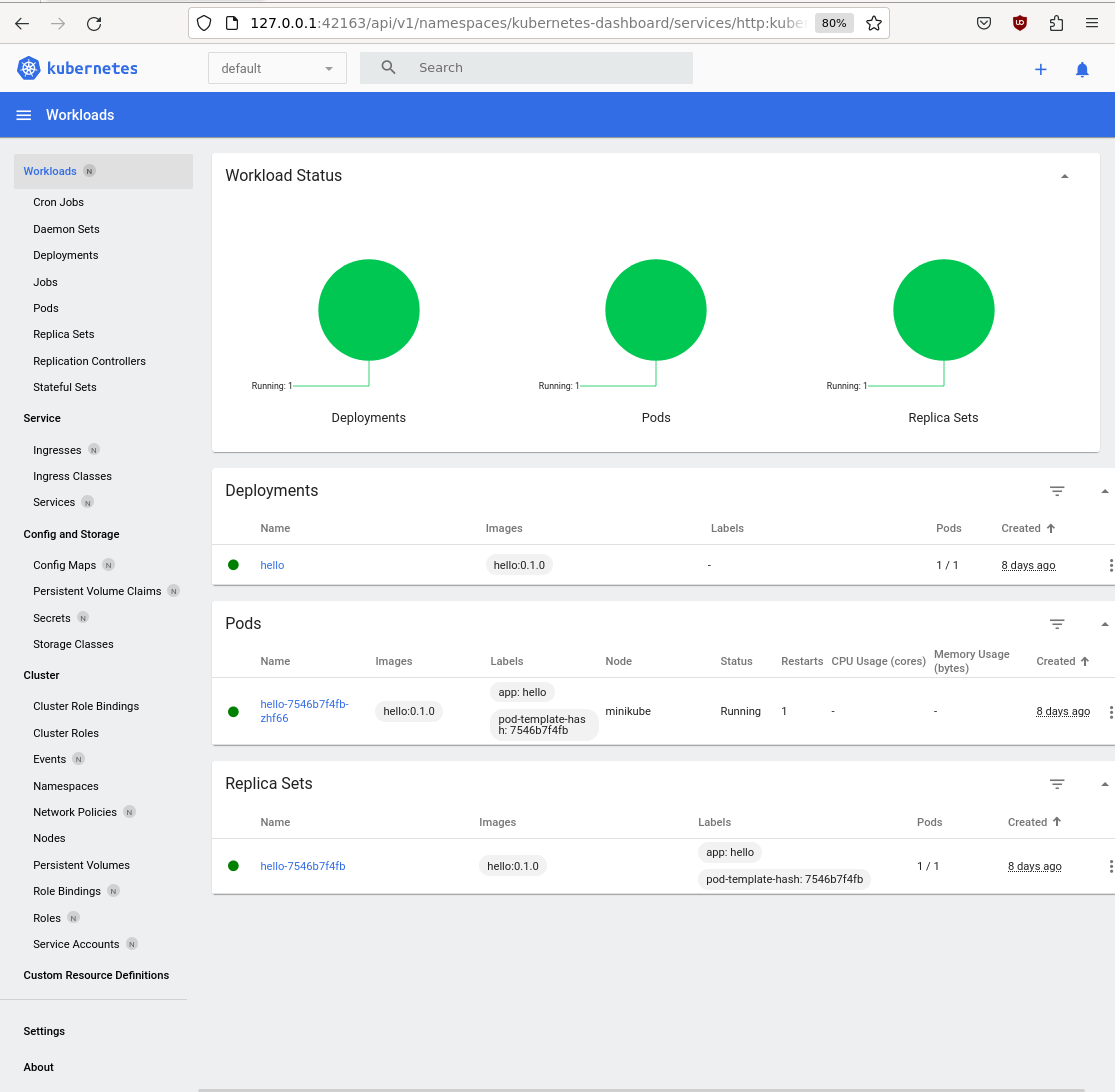
<h4 id="minikube-dashboard">minikube dashboard</h4>
<div class="language-plaintext highlighter-rouge"><div class="highlight"><pre class="highlight"><code>$ minikube dashboard
🔌  Enabling dashboard ...
    ▪ Using image docker.io/kubernetesui/metrics-scraper:v1.0.8
    ▪ Using image docker.io/kubernetesui/dashboard:v2.7.0
💡  Some dashboard features require the metrics-server addon. To enable all features please run:

        minikube addons enable metrics-server

🤔  Verifying dashboard health ...
🚀  Launching proxy ...
🤔  Verifying proxy health ...

</code></pre></div></div>
<p><img src="/assets/img/dashboard.png" alt="dashboard.png" /></p>

<p><img src="/assets/img/pods.png" alt="pods.png" /></p>

<h5 id="if-you-see-the-error">If you see the error:</h5>
<div class="language-plaintext highlighter-rouge"><div class="highlight"><pre class="highlight"><code>Container image "hello:0.1.0" is not present with pull policy of Never
Error: ErrImageNeverPull

Run the following command:

eval $(minikube docker-env)

*Rebuild* the docker image.
</code></pre></div></div>

<div class="language-plaintext highlighter-rouge"><div class="highlight"><pre class="highlight"><code>$ kubectl get pods -l app=hello -o yaml |grep containerPort
- containerPort: 8080
- containerPort: 8081

$ kubectl get pods
NAME                     READY   STATUS    RESTARTS      AGE
hello-7546b7f4fb-zhf66   1/1     Running   1 (18m ago)   8d
</code></pre></div></div>

<p>The kubectl port forward command will redirect the request (to the pod):</p>

<div class="language-plaintext highlighter-rouge"><div class="highlight"><pre class="highlight"><code>$ kubectl port-forward hello-7546b7f4fb-zhf66 8080
Forwarding from 127.0.0.1:8080 -&gt; 8080
Forwarding from [::1]:8080 -&gt; 8080

</code></pre></div></div>

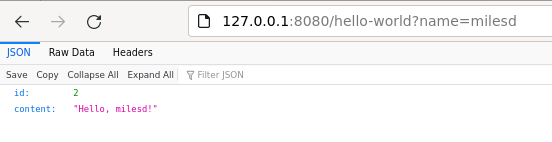
<p>Point your web browser at http://127.0.0.1:8080/hello-world?name=milesd</p>

<p><img src="/assets/img/8080.png" alt="8080.png" /></p>

<p>You will see the port redirection:</p>
<div class="language-plaintext highlighter-rouge"><div class="highlight"><pre class="highlight"><code>Handling connection for 8080
</code></pre></div></div>

<h3 id="terraform">Terraform</h3>

<blockquote>
  <blockquote>
    <blockquote>
      <p>Terraform</p>
    </blockquote>
  </blockquote>
</blockquote>

<p>This section is optional. You can use Terraform to deploy the hello:0.1.0 docker image to kubernetes (minikube):</p>

<p>Install <a href="https://learn.hashicorp.com/tutorials/terraform/install-cli">Terraform</a></p>

<h4 id="create-providerstf-and-maintf">Create providers.tf and main.tf</h4>

<p>Create a file named providers.tf:</p>
<div class="language-plaintext highlighter-rouge"><div class="highlight"><pre class="highlight"><code>terraform {
  required_providers {
    kubernetes = {
      source = "hashicorp/kubernetes"
      version = "2.11.0"
    }
  }
}

provider "kubernetes" {
  config_path    = "~/.kube/config"
  config_context = "minikube"
}
</code></pre></div></div>

<p>Create a file named main.tf:</p>
<div class="language-plaintext highlighter-rouge"><div class="highlight"><pre class="highlight"><code>resource "kubernetes_namespace" "hello" {
  metadata {
     name = "x"
  }
}

resource "kubernetes_deployment" "hello" {
  metadata {
    name = "terraform-example"
    labels = {
      test = "MyExampleApp"
    }
     namespace = "x"
  }

  spec {
    replicas = 1

    selector {
      match_labels = {
        test = "MyExampleApp"
      }
    }

    template {
      metadata {
        labels = {
          test = "MyExampleApp"
        }
      }

      spec {
        container {
          image = "hello:0.1.0"
          name  = "example"
          port {
            container_port = 8080
          }
        }
      }
    }
  }
}
</code></pre></div></div>

<p><strong>The important part is the image = “hello:0.1.0”, and the container_port = 8080.</strong></p>

<p>Run the following commands (terraform init, terraform plan, terraform apply, terraform destroy):</p>

<p><strong>terraform init</strong></p>
<div class="language-plaintext highlighter-rouge"><div class="highlight"><pre class="highlight"><code>$ terraform init
Initializing the backend...
Initializing provider plugins...
- Finding hashicorp/kubernetes versions matching "2.11.0"...
- Installing hashicorp/kubernetes v2.11.0...
- Installed hashicorp/kubernetes v2.11.0 (signed by HashiCorp)
Terraform has created a lock file .terraform.lock.hcl to record the provider
selections it made above. Include this file in your version control repository
so that Terraform can guarantee to make the same selections by default when
you run "terraform init" in the future.

Terraform has been successfully initialized!

You may now begin working with Terraform. Try running "terraform plan" to see
any changes that are required for your infrastructure. All Terraform commands
should now work.

If you ever set or change modules or backend configuration for Terraform,
rerun this command to reinitialize your working directory. If you forget, other
commands will detect it and remind you to do so if necessary.
$
</code></pre></div></div>

<p><strong>terraform plan</strong></p>

<div class="language-plaintext highlighter-rouge"><div class="highlight"><pre class="highlight"><code>$ terraform plan

Terraform used the selected providers to generate the following execution plan. Resource actions are indicated with the following symbols:
  + create

Terraform will perform the following actions:

  # kubernetes_deployment.hello will be created
  + resource "kubernetes_deployment" "hello" {
      + id               = (known after apply)
      + wait_for_rollout = true

      + metadata {
          + generation       = (known after apply)
          + labels           = {
              + "test" = "MyExampleApp"
            }
          + name             = "terraform-example"
          + namespace        = "x"
          + resource_version = (known after apply)
          + uid              = (known after apply)
        }

      + spec {
          + min_ready_seconds         = 0
          + paused                    = false
          + progress_deadline_seconds = 600
          + replicas                  = "1"
          + revision_history_limit    = 10

          + selector {
              + match_labels = {
                  + "test" = "MyExampleApp"
                }
            }

          + strategy (known after apply)

          + template {
              + metadata {
                  + generation       = (known after apply)
                  + labels           = {
                      + "test" = "MyExampleApp"
                    }
                  + name             = (known after apply)
                  + resource_version = (known after apply)
                  + uid              = (known after apply)
                }
              + spec {
                  + automount_service_account_token  = true
                  + dns_policy                       = "ClusterFirst"
                  + enable_service_links             = true
                  + host_ipc                         = false
                  + host_network                     = false
                  + host_pid                         = false
                  + hostname                         = (known after apply)
                  + node_name                        = (known after apply)
                  + restart_policy                   = "Always"
                  + service_account_name             = (known after apply)
                  + share_process_namespace          = false
                  + termination_grace_period_seconds = 30

                  + container {
                      + image                      = "hello:0.1.0"
                      + image_pull_policy          = (known after apply)
                      + name                       = "example"
                      + stdin                      = false
                      + stdin_once                 = false
                      + termination_message_path   = "/dev/termination-log"
                      + termination_message_policy = (known after apply)
                      + tty                        = false

                      + port {
                          + container_port = 8080
                          + protocol       = "TCP"
                        }

                      + resources (known after apply)
                    }

                  + image_pull_secrets (known after apply)

                  + readiness_gate (known after apply)

                  + volume (known after apply)
                }
            }
        }
    }

  # kubernetes_namespace.hello will be created
  + resource "kubernetes_namespace" "hello" {
      + id = (known after apply)

      + metadata {
          + generation       = (known after apply)
          + name             = "x"
          + resource_version = (known after apply)
          + uid              = (known after apply)
        }
    }

Plan: 2 to add, 0 to change, 0 to destroy.

──────────────────────────────────────────────────────────────────────────────────────────────────────────────────────────────────────────────────────────────────────────────────────────────────────────────────────────────────────────────────────────────────────────────────────────────────────────

Note: You didn't use the -out option to save this plan, so Terraform can't guarantee to take exactly these actions if you run "terraform apply" now.
$
</code></pre></div></div>

<p><strong>terraform apply</strong></p>

<div class="language-plaintext highlighter-rouge"><div class="highlight"><pre class="highlight"><code>$ terraform apply

Terraform used the selected providers to generate the following execution plan. Resource actions are indicated with the following symbols:
  + create

Terraform will perform the following actions:

  # kubernetes_deployment.hello will be created
  + resource "kubernetes_deployment" "hello" {
      + id               = (known after apply)
      + wait_for_rollout = true

      + metadata {
          + generation       = (known after apply)
          + labels           = {
              + "test" = "MyExampleApp"
            }
          + name             = "terraform-example"
          + namespace        = "x"
          + resource_version = (known after apply)
          + uid              = (known after apply)
        }

      + spec {
          + min_ready_seconds         = 0
          + paused                    = false
          + progress_deadline_seconds = 600
          + replicas                  = "1"
          + revision_history_limit    = 10

          + selector {
              + match_labels = {
                  + "test" = "MyExampleApp"
                }
            }

          + strategy (known after apply)

          + template {
              + metadata {
                  + generation       = (known after apply)
                  + labels           = {
                      + "test" = "MyExampleApp"
                    }
                  + name             = (known after apply)
                  + resource_version = (known after apply)
                  + uid              = (known after apply)
                }
              + spec {
                  + automount_service_account_token  = true
                  + dns_policy                       = "ClusterFirst"
                  + enable_service_links             = true
                  + host_ipc                         = false
                  + host_network                     = false
                  + host_pid                         = false
                  + hostname                         = (known after apply)
                  + node_name                        = (known after apply)
                  + restart_policy                   = "Always"
                  + service_account_name             = (known after apply)
                  + share_process_namespace          = false
                  + termination_grace_period_seconds = 30

                  + container {
                      + image                      = "hello:0.1.0"
                      + image_pull_policy          = (known after apply)
                      + name                       = "example"
                      + stdin                      = false
                      + stdin_once                 = false
                      + termination_message_path   = "/dev/termination-log"
                      + termination_message_policy = (known after apply)
                      + tty                        = false

                      + port {
                          + container_port = 8080
                          + protocol       = "TCP"
                        }

                      + resources (known after apply)
                    }

                  + image_pull_secrets (known after apply)

                  + readiness_gate (known after apply)

                  + volume (known after apply)
                }
            }
        }
    }

  # kubernetes_namespace.hello will be created
  + resource "kubernetes_namespace" "hello" {
      + id = (known after apply)

      + metadata {
          + generation       = (known after apply)
          + name             = "x"
          + resource_version = (known after apply)
          + uid              = (known after apply)
        }
    }

Plan: 2 to add, 0 to change, 0 to destroy.

Do you want to perform these actions?
  Terraform will perform the actions described above.
  Only 'yes' will be accepted to approve.

  Enter a value: yes

kubernetes_namespace.hello: Creating...
kubernetes_deployment.hello: Creating...
kubernetes_namespace.hello: Creation complete after 0s [id=x]
kubernetes_deployment.hello: Creation complete after 2s [id=x/terraform-example]

Apply complete! Resources: 2 added, 0 changed, 0 destroyed.
$
</code></pre></div></div>

<p>Use the kubectl command to check the deployment and pods:</p>
<div class="language-plaintext highlighter-rouge"><div class="highlight"><pre class="highlight"><code>$ kubectl get deployments -n x
NAME                READY   UP-TO-DATE   AVAILABLE   AGE
terraform-example   1/1     1            1           63s
$

$ kubectl get pods -n x
NAME                                 READY   STATUS    RESTARTS   AGE
terraform-example-7fb55bccdd-nwt6k   1/1     Running   0          97s
$

$kubectl get pods -n x -o yaml |grep containerPort
      - containerPort: 8080
$
</code></pre></div></div>

<p>The kubectl port forward command will redirect the request (to the pod):</p>
<div class="language-plaintext highlighter-rouge"><div class="highlight"><pre class="highlight"><code>$ kubectl port-forward -n x terraform-example-7fb55bccdd-nwt6k 8080
Forwarding from 127.0.0.1:8080 -&gt; 8080
Forwarding from [::1]:8080 -&gt; 8080
</code></pre></div></div>

<p>Use the curl command to go to http://127.0.0.1:8080/hello-world?name=alice</p>
<div class="language-plaintext highlighter-rouge"><div class="highlight"><pre class="highlight"><code>$ curl http://127.0.0.1:8080/hello-world?name=alice
{"id":2,"content":"Hello, alice!"}
$
</code></pre></div></div>

<p>The kubectl port forward will redirect the request:</p>
<div class="language-plaintext highlighter-rouge"><div class="highlight"><pre class="highlight"><code>$ kubectl port-forward -n x terraform-example-7fb55bccdd-nwt6k 8080
Forwarding from 127.0.0.1:8080 -&gt; 8080
Forwarding from [::1]:8080 -&gt; 8080
Handling connection for 8080
</code></pre></div></div>

<p><strong>terraform destroy</strong></p>

<div class="language-plaintext highlighter-rouge"><div class="highlight"><pre class="highlight"><code>$ terraform destroy
kubernetes_namespace.hello: Refreshing state... [id=x]
kubernetes_deployment.hello: Refreshing state... [id=x/terraform-example]

Terraform used the selected providers to generate the following execution plan. Resource actions are indicated with the following symbols:
  - destroy

Terraform will perform the following actions:

  # kubernetes_deployment.hello will be destroyed
  - resource "kubernetes_deployment" "hello" {
      - id               = "x/terraform-example" -&gt; null
      - wait_for_rollout = true -&gt; null

      - metadata {
          - annotations      = {} -&gt; null
          - generation       = 1 -&gt; null
          - labels           = {
              - "test" = "MyExampleApp"
            } -&gt; null
          - name             = "terraform-example" -&gt; null
          - namespace        = "x" -&gt; null
          - resource_version = "10005" -&gt; null
          - uid              = "9441f854-4935-451a-bb96-be6d59df2ce4" -&gt; null
            # (1 unchanged attribute hidden)
        }

      - spec {
          - min_ready_seconds         = 0 -&gt; null
          - paused                    = false -&gt; null
          - progress_deadline_seconds = 600 -&gt; null
          - replicas                  = "1" -&gt; null
          - revision_history_limit    = 10 -&gt; null

          - selector {
              - match_labels = {
                  - "test" = "MyExampleApp"
                } -&gt; null
            }

          - strategy {
              - type = "RollingUpdate" -&gt; null

              - rolling_update {
                  - max_surge       = "25%" -&gt; null
                  - max_unavailable = "25%" -&gt; null
                }
            }

          - template {
              - metadata {
                  - annotations      = {} -&gt; null
                  - generation       = 0 -&gt; null
                  - labels           = {
                      - "test" = "MyExampleApp"
                    } -&gt; null
                    name             = null
                    # (4 unchanged attributes hidden)
                }
              - spec {
                  - active_deadline_seconds          = 0 -&gt; null
                  - automount_service_account_token  = true -&gt; null
                  - dns_policy                       = "ClusterFirst" -&gt; null
                  - enable_service_links             = true -&gt; null
                  - host_ipc                         = false -&gt; null
                  - host_network                     = false -&gt; null
                  - host_pid                         = false -&gt; null
                  - node_selector                    = {} -&gt; null
                  - restart_policy                   = "Always" -&gt; null
                  - share_process_namespace          = false -&gt; null
                  - termination_grace_period_seconds = 30 -&gt; null
                    # (5 unchanged attributes hidden)

                  - container {
                      - args                       = [] -&gt; null
                      - command                    = [] -&gt; null
                      - image                      = "hello:0.1.0" -&gt; null
                      - image_pull_policy          = "IfNotPresent" -&gt; null
                      - name                       = "example" -&gt; null
                      - stdin                      = false -&gt; null
                      - stdin_once                 = false -&gt; null
                      - termination_message_path   = "/dev/termination-log" -&gt; null
                      - termination_message_policy = "File" -&gt; null
                      - tty                        = false -&gt; null
                        # (1 unchanged attribute hidden)

                      - port {
                          - container_port = 8080 -&gt; null
                          - host_port      = 0 -&gt; null
                            name           = null
                          - protocol       = "TCP" -&gt; null
                            # (1 unchanged attribute hidden)
                        }

                      - resources {}
                    }
                }
            }
        }
    }

  # kubernetes_namespace.hello will be destroyed
  - resource "kubernetes_namespace" "hello" {
      - id = "x" -&gt; null

      - metadata {
          - annotations      = {} -&gt; null
          - generation       = 0 -&gt; null
          - labels           = {} -&gt; null
          - name             = "x" -&gt; null
          - resource_version = "9983" -&gt; null
          - uid              = "7e2b974c-4c81-4e8c-8b35-1344075cc83e" -&gt; null
            # (1 unchanged attribute hidden)
        }
    }

Plan: 0 to add, 0 to change, 2 to destroy.

Do you really want to destroy all resources?
  Terraform will destroy all your managed infrastructure, as shown above.
  There is no undo. Only 'yes' will be accepted to confirm.

  Enter a value: yes

kubernetes_namespace.hello: Destroying... [id=x]
kubernetes_deployment.hello: Destroying... [id=x/terraform-example]
kubernetes_deployment.hello: Destruction complete after 0s
kubernetes_namespace.hello: Destruction complete after 6s

Destroy complete! Resources: 2 destroyed.
$
</code></pre></div></div>

<p><em>The port forward will stop:</em></p>
<div class="language-plaintext highlighter-rouge"><div class="highlight"><pre class="highlight"><code>E0813 13:22:00.190729   58487 portforward.go:413] an error occurred forwarding 8080 -&gt; 8080: error forwarding port 8080 to pod 915cbd57ef726b33b7f929a650602d0dfe627b7de455738bf8d786b777619103, uid : Error response from daemon: No such container: 915cbd57ef726b33b7f929a650602d0dfe627b7de455738bf8d786b777619103
error: lost connection to pod
</code></pre></div></div>

<p><em>The curl command will no longer work:</em></p>
<div class="language-plaintext highlighter-rouge"><div class="highlight"><pre class="highlight"><code>$ curl http://127.0.0.1:8080/hello-world?name=alice
curl: (52) Empty reply from server
</code></pre></div></div>]]></content><author><name>milesd</name></author><category term="Code" /><summary type="html"><![CDATA[Use MiniKube and Terraform to deploy a Dropwizard application]]></summary></entry><entry><title type="html">Terraform Lambda with API Gateway and Cloudfront</title><link href="http://localhost:4000/code/2024/02/01/Terraform-Lambda-with-API-Gateway-and-Cloudfront.html" rel="alternate" type="text/html" title="Terraform Lambda with API Gateway and Cloudfront" /><published>2024-02-01T20:20:00+00:00</published><updated>2024-02-01T20:20:00+00:00</updated><id>http://localhost:4000/code/2024/02/01/Terraform%20Lambda%20with%20API%20Gateway%20and%20Cloudfront</id><content type="html" xml:base="http://localhost:4000/code/2024/02/01/Terraform-Lambda-with-API-Gateway-and-Cloudfront.html"><![CDATA[<blockquote>
  <p>I’ve been working on getting a Terraform Lambda with API Gateway and Cloudfront solution…..</p>
</blockquote>

<p>“out there :)”</p>

<p><a href="https://github.com/chocksaway/terraform-lambda-api-gateway-cloudfront">Github terraform-lambda-api-gateway-cloudfront</a></p>

<p>Terraform:</p>
<div class="language-plaintext highlighter-rouge"><div class="highlight"><pre class="highlight"><code>terraform plan
terraform apply
terraform destroy
</code></pre></div></div>

<p><strong>Terraform</strong></p>

<p>I created an output, with details of API gateway, and Cloudfront endpoints:</p>
<div class="language-plaintext highlighter-rouge"><div class="highlight"><pre class="highlight"><code>Outputs:

api_gateway_base_url = "https://?????????.execute-api.eu-west-1.amazonaws.com/serverless_lambda_stage"
cloudfront_domain_name = "?????????.cloudfront.net"
function_name = "LambdaHelloWorld"
</code></pre></div></div>

<p>The Terraform apply, showing the invocation, and output:</p>

<div class="language-plaintext highlighter-rouge"><div class="highlight"><pre class="highlight"><code>$ terraform apply
data.archive_file.lambda_hello_world: Read complete after 0s [id=09af68f7ed976c5a14f035dc943f9283a1635106]
aws_iam_role.lambda_exec: Refreshing state... [id=serverless_lambda]
aws_apigatewayv2_api.lambda: Refreshing state... [id=?????????]
aws_cloudwatch_log_group.api_gw: Refreshing state... [id=/aws/api_gw/serverless_lambda_gw]
aws_cloudfront_distribution.hello_world: Refreshing state... [id=E1HUWRD4F8Y21K]
aws_apigatewayv2_stage.lambda: Refreshing state... [id=serverless_lambda_stage]
aws_iam_role_policy_attachment.lambda_policy: Refreshing state... [id=serverless_lambda-20240201200145515300000002]
aws_lambda_function.lambda_hello_world: Refreshing state... [id=LambdaHelloWorld]
aws_lambda_permission.api_gw: Refreshing state... [id=AllowExecutionFromAPIGateway]
aws_cloudwatch_log_group.hello_world: Refreshing state... [id=/aws/lambda/LambdaHelloWorld]
aws_apigatewayv2_integration.hello_world: Refreshing state... [id=nya2ry1]
aws_apigatewayv2_route.hello_world_options: Refreshing state... [id=6swtye3]
aws_apigatewayv2_route.hello_world: Refreshing state... [id=f04e338]
</code></pre></div></div>

<p>To execute the Lambda via Cloudfront:</p>
<div class="language-plaintext highlighter-rouge"><div class="highlight"><pre class="highlight"><code>$ curl -v https://?????????.cloudfront.net/serverless_lambda_stage/hello
*   Trying ????????????????...
* Connected to ?????????.cloudfront.net (?????????????????) port 443 (#0)
* ALPN, offering h2
* ALPN, offering http/1.1
[snip]
{"message":"Hello, World!"}
</code></pre></div></div>

<p>To execute the Lambda via API Gateway:</p>
<div class="language-plaintext highlighter-rouge"><div class="highlight"><pre class="highlight"><code>$ curl -v https://?????????.execute-api.eu-west-1.amazonaws.com/serverless_lambda_stage/hello
*   Trying ????????????????...
* Connected to ?????????.execute-api.eu-west-1.amazonaws.com (????????????????) port 443 (#0)
* ALPN, offering h2
* ALPN, offering http/1.1
[snip]
{"message":"Hello, World!"}
</code></pre></div></div>

<p>The name of the API Gateway “name” is <em>serverless_lambda_stage</em></p>

<p>The aws_apigatewayv2_route “route_key” is <em>hello</em></p>

<p>Don’t forget <code class="language-plaintext highlighter-rouge">terraform destroy</code> - so you don’t incur additional AWS cost.</p>]]></content><author><name>milesd</name></author><category term="Code" /><summary type="html"><![CDATA[I’ve been working on getting a Terraform Lambda with API Gateway and Cloudfront solution…..]]></summary></entry><entry><title type="html">Consistent Logging</title><link href="http://localhost:4000/code/2024/01/21/Consistent-Logging.html" rel="alternate" type="text/html" title="Consistent Logging" /><published>2024-01-21T20:20:00+00:00</published><updated>2024-01-21T20:20:00+00:00</updated><id>http://localhost:4000/code/2024/01/21/Consistent%20Logging</id><content type="html" xml:base="http://localhost:4000/code/2024/01/21/Consistent-Logging.html"><![CDATA[<p>I recently had the age old error:</p>
<div class="language-plaintext highlighter-rouge"><div class="highlight"><pre class="highlight"><code>   SLF4J: No SLF4J providers were found.
   SLF4J: Defaulting to no-operation (NOP) logger implementation
</code></pre></div></div>
<p>This was mid-coding, right when I needed logs to “display” :)</p>

<p>This will also prevent the error:</p>
<div class="language-plaintext highlighter-rouge"><div class="highlight"><pre class="highlight"><code>java.lang.NoSuchMethodError: 'java.lang.ClassLoader ch.qos.logback.core.util.Loader.systemClassloaderIfNull(java.lang.ClassLoader)
</code></pre></div></div>

<p>I added the following to my pom.xml:</p>

<div class="language-plaintext highlighter-rouge"><div class="highlight"><pre class="highlight"><code>&lt;dependency&gt;
      &lt;groupId&gt;ch.qos.logback&lt;/groupId&gt;
      &lt;artifactId&gt;logback-classic&lt;/artifactId&gt;
      &lt;version&gt;1.4.13&lt;/version&gt;
    &lt;/dependency&gt;

    &lt;dependency&gt;
      &lt;groupId&gt;ch.qos.logback&lt;/groupId&gt;
      &lt;artifactId&gt;logback-core&lt;/artifactId&gt;
      &lt;version&gt;1.4.13&lt;/version&gt;
    &lt;/dependency&gt;
&lt;/dependency&gt;

</code></pre></div></div>]]></content><author><name>milesd</name></author><category term="Code" /><summary type="html"><![CDATA[I recently had the age old error: SLF4J: No SLF4J providers were found. SLF4J: Defaulting to no-operation (NOP) logger implementation This was mid-coding, right when I needed logs to “display” :)]]></summary></entry><entry><title type="html">Terraform Lambda Layers</title><link href="http://localhost:4000/code/2024/01/21/Terraform-Lambda-Layers.html" rel="alternate" type="text/html" title="Terraform Lambda Layers" /><published>2024-01-21T20:20:00+00:00</published><updated>2024-01-21T20:20:00+00:00</updated><id>http://localhost:4000/code/2024/01/21/Terraform%20Lambda%20Layers</id><content type="html" xml:base="http://localhost:4000/code/2024/01/21/Terraform-Lambda-Layers.html"><![CDATA[<blockquote>
  <p>There are number of Terraform Lambda tutorials which say you need an S3 bucket (for the Layer).</p>
</blockquote>

<p>You don’t.</p>

<p>I recently implemented a POC, which had one job.  To implement a Lambda Layer for some simple Node code, and wrap in Terraform.</p>

<p><a href="https://bobbyhadz.com/blog/aws-lambda-cannot-find-module">Credit for the node code</a></p>

<p><a href="https://github.com/chocksaway/terraform-lambda-layer-no-s3">Terraform and node code (github)</a></p>

<p>Create and zip source and dependencies:</p>
<div class="language-plaintext highlighter-rouge"><div class="highlight"><pre class="highlight"><code>cd layers/date-fns/nodejs
npm init -y
npm install date-fns@2.24.0
zip -r9 date-fns-layer.zip .
</code></pre></div></div>

<p>Zip the Lambda code:</p>
<div class="language-plaintext highlighter-rouge"><div class="highlight"><pre class="highlight"><code>zip -r9 lambda.zip index.js
</code></pre></div></div>

<p>Terraform:</p>
<div class="language-plaintext highlighter-rouge"><div class="highlight"><pre class="highlight"><code>terraform plan
terraform apply
terraform destroy
</code></pre></div></div>

<p><strong>Terraform</strong></p>

<p>The Layer:</p>
<div class="language-plaintext highlighter-rouge"><div class="highlight"><pre class="highlight"><code>resource "aws_lambda_layer_version" "simple_node_lambda-layer" {
  filename            = "layers/date-fns/date-fns-layer.zip"
  layer_name          = "simple_node_lambda-layer"
  source_code_hash    = "${filebase64sha256("layers/date-fns/date-fns-layer.zip")}"
  compatible_runtimes = ["nodejs14.x"]
}
</code></pre></div></div>

<p>The Lambda references the Layer:</p>

<div class="language-plaintext highlighter-rouge"><div class="highlight"><pre class="highlight"><code>resource "aws_lambda_function" "simple_node_lambda_function" {
  filename      = "lambda.zip"
  function_name = "SimpleNodeLambdaFunction"
  role          = aws_iam_role.simple-node-lambda_role.arn
  handler       = "index.handler"
  source_code_hash = filebase64sha256("lambda.zip")
  runtime = "nodejs14.x"
  layers = [aws_lambda_layer_version.simple_node_lambda-layer.arn]
}
</code></pre></div></div>

<p>I found a useful terraform module, aws_lambda_invocation:</p>

<div class="language-plaintext highlighter-rouge"><div class="highlight"><pre class="highlight"><code>resource "aws_lambda_invocation" "lambda_invocation" {
  function_name = "SimpleNodeLambdaFunction"

  input = jsonencode({
    hello = "world"
  })


  triggers = {
    redeployment = timestamp()
  }

  depends_on = [
    aws_lambda_function.simple_node_lambda_function
  ]
}
</code></pre></div></div>

<p>I created an output, which outputs the Lambda invocation:</p>
<div class="language-plaintext highlighter-rouge"><div class="highlight"><pre class="highlight"><code>output "lambda_invoke" {
  description = "Result of Lambda invocation"
  value       = aws_lambda_invocation.lambda_invocation.result
}
</code></pre></div></div>

<p>The Terraform apply, showing the invocation, and output:</p>

<div class="language-plaintext highlighter-rouge"><div class="highlight"><pre class="highlight"><code>aws_iam_role.simple-node-lambda_role: Creating...
aws_cloudwatch_log_group.main: Creating...
aws_lambda_layer_version.simple_node_lambda-layer: Creating...
aws_cloudwatch_log_group.main: Creation complete after 0s [id=SimpleNodeLambdaFunction]
aws_iam_role.simple-node-lambda_role: Creation complete after 1s [id=simple-node_role]
aws_iam_role_policy.lambda_basic_policy: Creating...
aws_iam_role_policy.lambda_basic_policy: Creation complete after 0s [id=simple-node_role:lambda_simple_node_basic_policy]
aws_lambda_layer_version.simple_node_lambda-layer: Still creating... [10s elapsed]
aws_lambda_layer_version.simple_node_lambda-layer: Creation complete after 15s [id=arn:aws:lambda:eu-west-1:457954557100:layer:simple_node_lambda-layer:7]
aws_lambda_function.simple_node_lambda_function: Creating...
aws_lambda_function.simple_node_lambda_function: Creation complete after 9s [id=SimpleNodeLambdaFunction]
aws_lambda_invocation.lambda_invocation: Creating...
aws_lambda_invocation.lambda_invocation: Creation complete after 1s [id=SimpleNodeLambdaFunction_$LATEST_fbc24bcc7a1794758fc1327fcfebdaf6]

Apply complete! Resources: 6 added, 0 changed, 0 destroyed.

Outputs:

lambda_invoke = "{\"statusCode\":200,\"body\":\"{\\\"today\\\":\\\"👉️ Today is a Sunday\\\"}\"}"
</code></pre></div></div>

<p>Terraform (continued):</p>

<p>IAM role:</p>
<div class="language-plaintext highlighter-rouge"><div class="highlight"><pre class="highlight"><code>resource "aws_iam_role" "simple-node-lambda_role" {
  name = "simple-node_role"

  assume_role_policy = &lt;&lt;EOF
{
  "Version": "2012-10-17",
  "Statement": [
    {
      "Action": "sts:AssumeRole",
      "Principal": {
        "Service": "lambda.amazonaws.com"
      },
      "Effect": "Allow",
      "Sid": ""
    }
  ]
}
EOF
}
</code></pre></div></div>

<p>IAM Role Policy (for cloudwatch logs:)</p>

<div class="language-plaintext highlighter-rouge"><div class="highlight"><pre class="highlight"><code>resource "aws_iam_role_policy" "lambda_basic_policy" {
  name = "lambda_simple_node_basic_policy"
  role = aws_iam_role.simple-node-lambda_role.id

  policy = &lt;&lt;EOF
{
	  "Version": "2012-10-17",
	  "Statement": [
	    {
	      "Effect": "Allow",
	      "Action": [
	        "logs:CreateLogGroup",
	        "logs:CreateLogStream",
	        "logs:PutLogEvents"
	      ],
	      "Resource": [
	        "arn:aws:logs:*:*:*"
	      ]
	    }
	  ]
	}
	EOF
}

resource "aws_cloudwatch_log_group" "main" {
  name              = "SimpleNodeLambdaFunction"
  retention_in_days = 1
}
</code></pre></div></div>]]></content><author><name>milesd</name></author><category term="Code" /><summary type="html"><![CDATA[There are number of Terraform Lambda tutorials which say you need an S3 bucket (for the Layer).]]></summary></entry></feed>